

Best Camera Glasses in 2026: What Actually Matters Before You Buy
Skip the 4K marketing hype. Learn how to choose camera glasses, smart glasses with camera and AI camera glasses by the features that actually matter in everyday use.
Buying camera glasses is surprisingly easy to get wrong.
A product page may emphasise 4K video, long battery life or AI features, but those headline numbers rarely tell the whole story. Some glasses look impressive on paper but feel bulky after extended wear. Others advertise long battery life even though video recording consumes far more power than music playback.
And a higher video resolution does not automatically mean better-looking footage.
In 2026, choosing the best camera glasses is therefore less about chasing the largest number and more about matching the glasses to how you actually plan to use them.
This guide covers consumer glasses with camera technology for travel, everyday recording, Bluetooth calls, open-ear audio, prescription wear and AI features. It does not cover industrial body cameras or law-enforcement recording equipment.
Quick Answer: What Are the Best Camera Glasses in 2026?
The best camera glasses are not necessarily the pair with the longest specification sheet.
For most buyers, the right choice depends on what you want to capture, how long you plan to wear the glasses and which smart features you will actually use.
For buyers looking for AI smart glasses with camera plus Bluetooth audio and interchangeable lenses, the IIFACTOR M08E combines a 13MP Sony IMX681 camera, 1080p recording, Bluetooth 5.4, open-ear audio and AI features in a lightweight design.
What Has Changed in Camera Glasses in 2026?
The category has expanded well beyond simple wearable recording.
Camera, Bluetooth audio and AI are converging
Modern smart glasses with camera may now combine:
- hands-free photography;
- first-person video;
- Bluetooth calls;
- open-ear music;
- microphones;
- Wi-Fi file transfer;
- AI voice assistance;
- translation.
That means camera quality is only one part of the buying decision.
If you plan to wear the glasses on a commute, while travelling or during everyday activities, features such as comfort, audio and phone connectivity can matter just as much as video resolution.
Camera glasses increasingly look like everyday eyewear
Wearability has become a much bigger part of the category.
When comparing glasses with camera, pay attention to:
- frame weight;
- temple thickness;
- frame balance;
- nose comfort;
- lens types;
- prescription compatibility.
The closer the glasses feel to normal eyewear, the easier they are to integrate into everyday life.
Open-ear audio is becoming more useful
Many modern smart glasses with camera and audio use open-ear speakers rather than in-ear earbuds.
That lets you listen to:
- music;
- calls;
- navigation;
- voice assistance;
- while remaining more aware of your surroundings.
This is particularly useful when walking, travelling or commuting.
Prescription compatibility matters more
As smart eyewear becomes more practical for daily wear, prescription smart glasses with camera are becoming more relevant.
If you normally wear corrective lenses, lens compatibility should be checked before camera resolution or AI functions.
Privacy remains part of responsible use
Wearable cameras make hands-free recording easier, but recording laws still apply.
Singapore's Ministry of Digital Development and Information noted in May 2026 that existing laws governing privacy, harassment, voyeurism and misuse of personal data continue to apply regardless of whether a recording device is a phone, conventional camera or smart glasses.
As a practical rule, get permission before intentionally recording another person, particularly in private, sensitive or restricted environments.
What Type of Camera Glasses Do You Need?
Not all camera glasses serve the same purpose.
Camera-first glasses
These focus primarily on hands-free capture.
Typical uses include:
- travel;
- walking;
- cycling;
- family moments;
- work documentation;
- first-person video.
They are suitable when photography or recording is the main reason you want wearable glasses.
Smart glasses with camera
Smart glasses with camera add everyday functions such as:
- Bluetooth;
- speakers;
- microphones;
- calls;
- music;
- phone connectivity;
- Wi-Fi transfer.
For many users, this makes the glasses useful even when the camera is not active.
AI glasses with camera
AI glasses with camera add software-driven features such as:
translation;
voice questions;
AI assistants;
voice reminders;
image-related functions.
The most useful AI features depend on how well the glasses work with their companion app and smartphone connection.
What Should You Look for in Camera Glasses?
1. Real video quality
Do not judge camera quality by resolution alone.
Also consider:
- camera sensor;
- frame rate;
- exposure;
- bitrate;
- compression;
- stabilisation;
- field of view.
For everyday clips, stable and properly exposed 1080p footage can be more useful than poorly processed video with a larger resolution number.
If you want to go deeper, this guide on evaluating an AI glasses camera covers sensor quality, bitrate and stabilisation in more detail.
2. Actual recording time
Battery life and video recording time are different specifications.
Video requires power for:
- the image sensor;
- processor;
- microphones;
- storage.
- Music playback generally uses much less power.
When comparing video camera glasses, always look specifically for video recording time.
3. Comfort and weight
The most advanced camera is not much use if the glasses are uncomfortable to wear.
Pay attention to:
- weight;
- nose pressure;
- temple pressure;
- balance;
- frame dimensions.
This is especially important for people using camera glasses for travel or everyday wear.
4. Phone connectivity
Searches for camera glasses that connect to phone often combine several different functions.
Bluetooth may handle:
- calls;
- music;
- controls.
- Wi-Fi may handle:
- photos;
- videos;
- recordings;
- live view.
Check exactly how files move from the glasses to your phone.
5. Bluetooth and open-ear audio
For people looking for glasses with camera and Bluetooth, audio quality can become just as important as recording.
Open-ear speakers allow you to use the glasses for:
- music;
- calls;
- voice assistants;
- without inserting earbuds.
6. Lens options
Useful lens configurations include:
- clear lenses;
- sunglasses;
- photochromic lenses;
- prescription lenses.
If you expect to use your camera glasses indoors and outdoors, interchangeable or adaptive lenses can make one frame much more versatile.
7. Storage
Check:
- internal storage capacity;
- estimated video capacity;
- whether a phone is required;
- how files are transferred.
Storage matters most when you want to capture multiple clips away from your phone.
Camera Glasses Specs That Can Mislead You
A specification sheet can tell you a lot—but only if you interpret the numbers correctly.
“4K” does not automatically mean better video
There is strong search interest around 4K camera glasses, but resolution alone does not determine image quality.
Video quality also depends on:
sensor performance;
native output resolution;
bitrate;
processing;
compression;
frame rate;
stabilisation.
A clean 1080p recording can look better than badly compressed or interpolated 4K footage.
Megapixels and video resolution are different
A high-megapixel photo sensor does not mean the glasses record video at the same resolution.
For example, the M08E uses a 13MP Sony IMX681 camera, while its listed video recording resolution is 1080p.
This is normal for wearable cameras.
Music battery life is not video battery life
Open-ear smart glasses often quote music playback as the headline battery number.
That number should not be used as a proxy for camera runtime.
When comparing camera recording glasses, look for the recording specification independently.
“AI” can describe very different features
Before choosing AI camera glasses, check:
whether AI requires a companion app;
whether internet access is needed;
which languages are supported;
whether voice interaction is available;
which features use the camera.
AI can add useful functionality, but the experience depends on the software as much as the hardware.
IIFACTOR M08E: Affordable AI Smart Glasses with Camera
The IIFACTOR M08E is designed around everyday smart-glasses use rather than being only a wearable camera.
It combines:
13MP Sony IMX681 camera;
1080p video recording;
Bluetooth 5.4;
dual-microphone ENC;
open-ear audio;
AI functions;
photochromic, clear and sunglass lenses;
a lightweight 39g-class design.
This combination makes it particularly relevant to buyers searching for smart glasses with camera and audio, rather than simple recording-only glasses. For a detailed breakdown, see this comparison of affordable AI smart glasses.

13MP first-person camera
The Sony IMX681 camera is designed for hands-free first-person capture.
This can be useful when:
travelling;
walking;
spending time with family;
documenting everyday moments;
recording short POV clips.
You can capture without repeatedly reaching for a phone or holding a camera in front of you.
1080p video with software stabilisation
The M08E records 1080p video and the product page lists software stabilisation for smoother first-person footage.
For everyday wearable recording, video usability is influenced by much more than resolution alone.
Sensor quality, movement, exposure and stabilisation all matter.
Bluetooth 5.4 and open-ear audio
The M08E is also designed as a pair of Bluetooth glasses with camera.
Bluetooth 5.4 and dual-mic ENC support:
music;
calls;
hands-free communication.
Open-ear speakers allow users to hear audio while remaining aware of their surrounding environment.
That gives the glasses a useful role even when you are not taking photos or recording video.
AI voice assistance and translation
The companion app provides functions including:
AI voice assistance;
translation;
simultaneous interpretation;
voice recording;
live view.
IIFACTOR currently lists support for more than 100 languages through the app.
This is particularly relevant for buyers looking for AI glasses with camera for travel and multilingual communication. You can read more in this full M08E review.
Three lens options
The M08E includes:
photochromic lenses;
clear lenses;
sunglass lenses.
That means the same frame can be used across different lighting conditions.
Photochromic lenses are especially useful for users moving frequently between indoor and outdoor environments.
Prescription-lens compatibility
The frame can also support prescription use, giving people who normally wear corrective lenses another way to integrate wearable technology into everyday life.
This is an important consideration for anyone researching prescription camera glasses or prescription smart glasses with camera.
Designed for everyday wear
The M08E weighs about 39g and has an IPX4 water-resistance rating.
That combination supports use cases such as:
travel;
commuting;
walking;
outdoor sightseeing;
daily smart-glasses use.
Who is the M08E designed for?
The M08E fits users who want one wearable device for several everyday tasks:
hands-free photography;
short first-person videos;
open-ear music;
Bluetooth calling;
AI voice interaction;
translation;
clear or sunglass use;
prescription-lens compatibility.
Instead of buying camera glasses solely for recording, this approach makes the frame useful throughout more of the day.
Best Camera Glasses by Real-World Use Case
The easiest way to choose is to start with the situation rather than the specification sheet.
For travel
Prioritise:
low weight → camera access → phone transfer → lens flexibility → translation
For travel, AI smart glasses with camera can be particularly useful because photography, open-ear audio and translation can all be available in one wearable.
For walking and everyday recording
Prioritise:
comfort → easy controls → stabilisation → camera position
Hands-free recording works best when capturing moments feels quicker than taking out a phone.
For commuting
Prioritise:
open-ear audio → Bluetooth → calls → comfort
For commuters, smart glasses with camera and Bluetooth can provide more everyday value than camera-only glasses.
For cycling and outdoor activity
Prioritise:
secure fit → outdoor lenses → water resistance → audio awareness
Camera sunglasses or photochromic camera glasses can make sense when most use takes place outdoors.
For calls and music
Prioritise:
Bluetooth stability → microphone quality → speakers → comfort
If audio is used every day, the glasses effectively become an open-ear wearable as well as a camera device.
For prescription wear
Prioritise:
lens compatibility → comfort → frame fit
For prescription users, the best technology is the technology you can comfortably wear throughout the day. If you are unsure about lens compatibility, this guide on contact lens prescription vs glasses prescription may help.
Are 4K Camera Glasses Actually Better?
Not automatically.
Native 4K provides more pixels than 1080p and can deliver more detail when the camera system supports it well.
But final video quality also depends on:
sensor quality;
bitrate;
processing;
compression;
exposure;
stabilisation;
frame rate.
That means 4K camera glasses should be evaluated as a complete imaging system rather than by one specification.
For casual travel footage, social clips and everyday POV recording, good 1080p can already provide useful results.
The most important question is not:
“Does it say 4K?”
It is:
“What does the actual footage look like?”
Camera Glasses vs Smart Glasses with Camera: What's the Difference?
The two categories overlap.
Camera glasses primarily focus on hands-free photo and video capture.
Smart glasses with camera combine recording with additional functions such as:
Bluetooth;
calls;
open-ear speakers;
microphones;
phone connectivity;
AI;
translation.
The second category is designed to remain useful when you are not actively recording.
If you want a device that fits into everyday commuting, travel and communication, smart functions can add more value than camera resolution alone.
Camera Sunglasses vs Sunglasses with Camera
The terms camera sunglasses and sunglasses with camera describe essentially the same category: eyewear designed for outdoor use with integrated photo or video capture.
They can be useful for:
- travel;
- walking;
- sightseeing;
- commuting;
- outdoor activities.
When choosing them, consider more than the camera.
Also check:
- UV protection;
- lens type;
- secure fit;
- water resistance;
- weight.
Photochromic lenses provide another option because they can adapt to changing lighting conditions without requiring a separate pair of glasses.
Can You Get Prescription Smart Glasses with Camera?
Yes.
Some frames support prescription lenses, allowing the smart-glasses hardware to function as everyday eyewear.
When shopping for prescription smart glasses with camera, check:
whether prescription lenses are supported;
whether the lenses can be replaced;
what lens types fit the frame;
whether your optician can work with the frame.
For people who normally wear glasses every day, prescription compatibility can be more important than an extra camera specification.
Do You Actually Need AI in Camera Glasses?
AI is becoming increasingly common, but it should solve a real problem.
Useful examples include:
translation while travelling;
voice questions;
hands-free assistance;
reminders;
image-related queries.
This is where AI glasses with camera differ from basic video-recording glasses.
The combination of camera, microphones, phone connectivity and software gives them more ways to assist throughout the day.
Before buying, ask:
Which AI feature would I actually use every week?
That is usually a better buying question than simply asking whether the product has AI. To see what AI smart glasses can actually do in practice, check these real-world use cases.
Can Camera Glasses Replace a Phone or Action Camera?
Camera glasses offer something a phone cannot do as naturally:
capture roughly what you are seeing while keeping both hands free.
That makes them particularly useful for:
spontaneous moments;
travel;
walking;
first-person clips.
Phones remain useful for deliberate composition, zooming and editing.
Dedicated cameras remain useful for specialised filming.
Camera glasses therefore work best as a complementary camera format built around convenience and first-person perspective.
Camera Glasses Buying Checklist
Before buying, check these specifications:
Camera sensor: What sensor is used?
Actual video resolution: What does the device record natively?
Frame rate: Is the recording smooth enough for your needs?
Recording time: How does video use affect battery life?
Weight: Will the frame be comfortable for daily wear?
Phone connectivity: Bluetooth, Wi-Fi or both?
Storage: How much media can be stored locally?
Lens options: Clear, sunglass or photochromic?
Prescription support: Can corrective lenses be fitted?
Audio: Does it support music and calls?
AI: What does the companion software actually provide?
Water resistance: Is it suitable for your intended environment?
For most buyers, a good priority order is:
comfort → camera quality → connectivity → lens options → audio → AI
This prevents eye-catching specifications from distracting you from everyday usability. For a more structured approach, the AI smart glasses buyer's guide covers core technology and 2026 hardware specifications in detail.
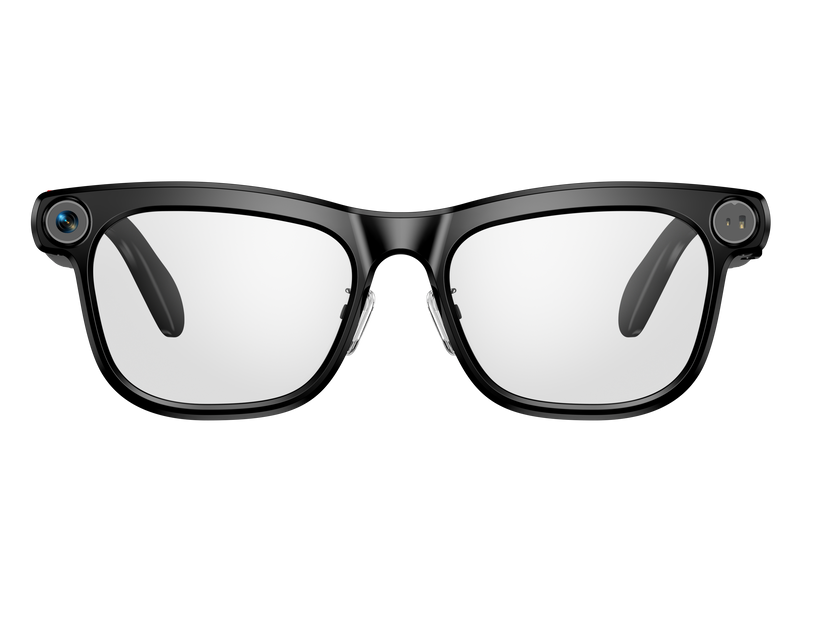
IIFACTOR M08E — AI Smart Glasses with Camera
Frequently Asked Questions
What are the best camera glasses in 2026?
The best camera glasses depend on your use case. For everyday recording, prioritise comfort, camera quality and simple controls. For daily wearable use, Bluetooth audio, phone connectivity and lens options become increasingly important.
What are smart glasses with camera?
Smart glasses with camera combine hands-free photo or video capture with additional functions such as Bluetooth audio, phone calls, microphones, apps or AI assistance.
Are glasses with camera useful for everyday use?
Yes. Modern glasses with camera can be useful for travel, short POV clips, commuting, calls and hands-free photography, especially when they also include Bluetooth audio and comfortable everyday lenses.
Can camera glasses connect to a phone?
Yes. Many camera glasses that connect to phone use Bluetooth, Wi-Fi or both. Bluetooth often handles calls and audio, while Wi-Fi may be used to transfer photos and video.
Are there smart glasses with camera and audio?
Yes. Smart glasses with camera and audio combine recording with microphones and open-ear speakers, allowing one pair of glasses to support photography, video, calls and music.
Are there glasses with camera and Bluetooth?
Yes. Glasses with camera and Bluetooth can connect to a smartphone for features such as music, calls and hands-free communication.
What are AI glasses with camera?
AI glasses with camera combine wearable photography or video with AI-powered software features such as translation, voice assistance or visual queries. To learn more about everyday AI capabilities, see what AI smart glasses can actually do.
Are AI smart glasses with camera useful for travel?
They can be particularly useful when they combine hands-free photography, translation, open-ear audio and phone connectivity in one wearable device.
Can you get prescription smart glasses with camera?
Yes. Some prescription smart glasses with camera support corrective lenses. Always verify prescription compatibility before purchasing.
Are sunglasses with camera useful?
Yes. Sunglasses with camera can be useful for walking, travelling and outdoor activities because they combine eye protection with hands-free capture.
Are 4K camera glasses better than 1080p?
Not necessarily. 4K camera glasses provide a higher resolution when the footage is genuinely recorded at native 4K, but sensor quality, bitrate, stabilisation, exposure and compression also affect image quality.
What are open-ear smart glasses?
Open-ear smart glasses place speakers near the ear rather than inside the ear canal. They can play music, handle calls and provide voice assistance while leaving your ears more open to surrounding sounds.
What is the difference between camera glasses and AI smart glasses?
Camera glasses primarily focus on photo and video capture. AI smart glasses with camera add software features such as translation, voice assistance and other connected functions.